
Activity Timer
For Microsoft Dynamics CRM

A Fixed time could be applied to a Phone Call Activity to function as a minimum time charge for uncompleted calls and upon a conversation starting the Activity Timer can be manually started to override the fixed time with the actual call duration. An "Auto" function setting allows automatic starting and stopping upon Open and Close of the selected Activity types which greatly reduces User time tracking errors and enhances professional productivity. Actual Timed Duration field added by this option is available in CRM Activity and History Views, forms, and custom reports. This utility is sold with Per User Licensing equal to the number of Dynamics CRM Licenses enabled.
ActivityTimer ...
See how accurate time tracking and reporting will improve your CRM operations.
Easier time tracking makes it happen. Better CRM Activity time tracking makes for better client relations and that makes for greater revenue realized.
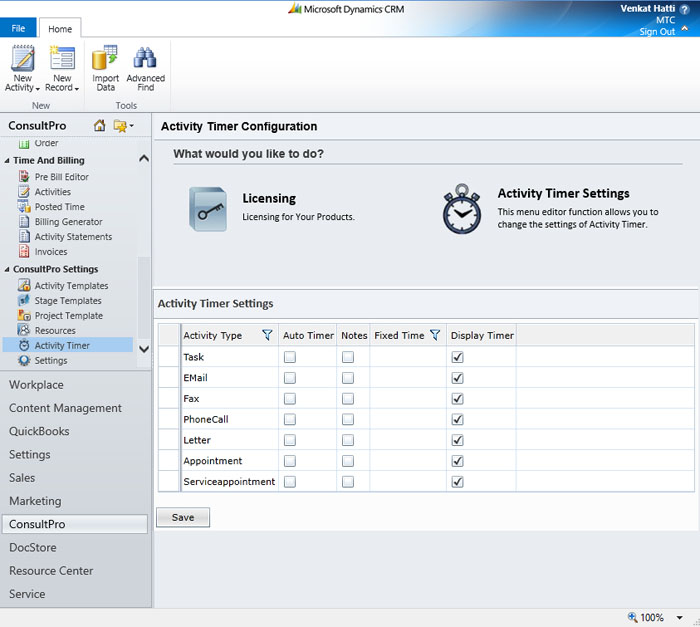
- Settings allow Solution-wide Timing Function Control that includes:
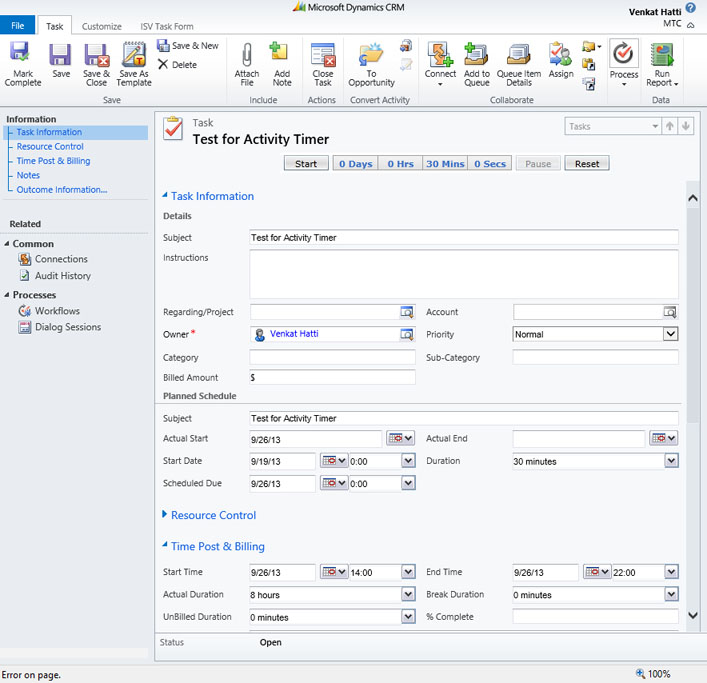
- Stopwatch started and stopped by User for a larger Task
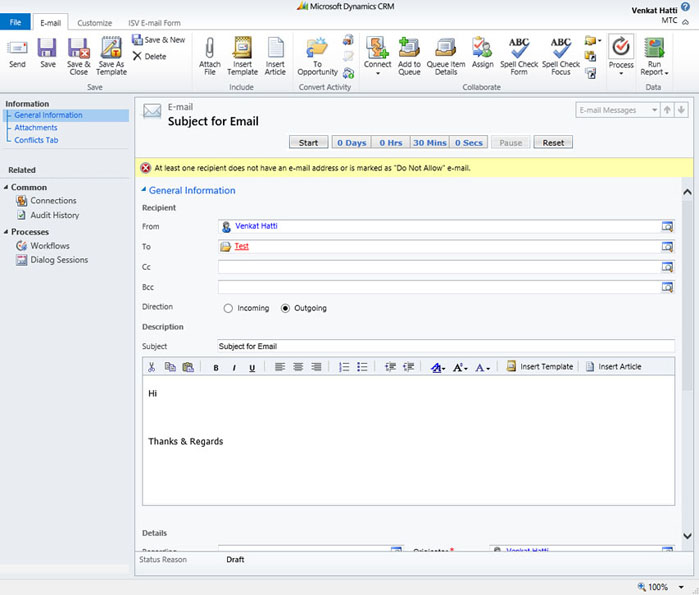
- Stopwatch started on open stopped and recorded by close
- User start/stop Override at Task Level
- User Time Override at Task Level
- Automatic Fixed-Time for instant Activities i.e. bulk emails, letters, fax
- Hide or Show Stopwatch time appearance in CRM Activity
- Automatic note entry update prompt on pause of stop watch to not breaks in Activity
- An Activity Time View for fast handling of time for Projects, Accounts, and Users.
- Trigger Dynamics CRM Workflow from in-process Activity Timing to enhance solution development
- Complete compliance to the Microsoft Dynamics CRM SDK
- All CRM Modes – On-Premises, Internet Facing Deployment (IFD), Microsoft CRM online, Hosted
Task: Time manually where the task is started and stopped more than once during the Task and for tasks of longer duration
Fax: Use with Auto-Time for exact time of ad-hoc fax transmissions Use Fixed Time of around 1-10 minutes for electronic cover transmission or bulk fax transmissions.
Phone Call: Typically Timed by AutoTime start upon Open and stop by Close or Close/Complete Can be timed manually for User start and stop with user discipline
E-mail: ypically Timed by AutoTime start upon Open and stop by Send Use Fixed Time of around 1-10 minutes for manual, workflow triggered or template send
Letters: Typically Auto Timed but could be Fixed for template use.
Appointment: Time manually where the Appointment is started and stopped more than once during the Activity or a manual override is anticipated Use Fixed Time for standard minute/hour Appointment delivery is to be tracked
Service Activity: Typically manually Timed started and stopped by User Use Fixed Time standard services delivery of a pre-set fee for a service Appointment
Campaign: Typically tracked fixed at a small increment of 1 minute if tracked at all
- Ideal for any business that would benefit from accurate actual time capture.
- Perfect for professional services businesses that use Dynamics CRM extensively for their professional services delivery functions where CRM Activities drive “To Do” and engagement activities to completion.
- Complete the missing link in the standard Dynamics CRM Service operations Activity management, tracking, and analysis.
- A must for Sales Management where tracking of time in sales activities yields better understanding and control of process times for continuous improvement of sales productivity.
- An essential business process metric enhancement tool for mission critical solutions built on Dynamics CRM where user time is money and time savings equal cost reductions.
Licensed to match number of CRM Users for lowest cost. 1st year CRM-upgrade coverage, feature enhancement, and unlimited installation and configuration support. Annual support and maintenance renewal at 25%.
Partner NFR program, OEM, and custom development available from MTC to support unique needs
Downloads


Pricing & Ordering
- Per CRM Organization
$249.00
- Per CRM Enabled User
$5.00

